.webp)


%20(1).webp)


Blog
13
min read
A WIF Of Fresh Access: How a GitHub Issue on Gemini-CLI Led to GCP Project Compromise
%20(1).webp)

13
min read
.webp)
Executive Summary
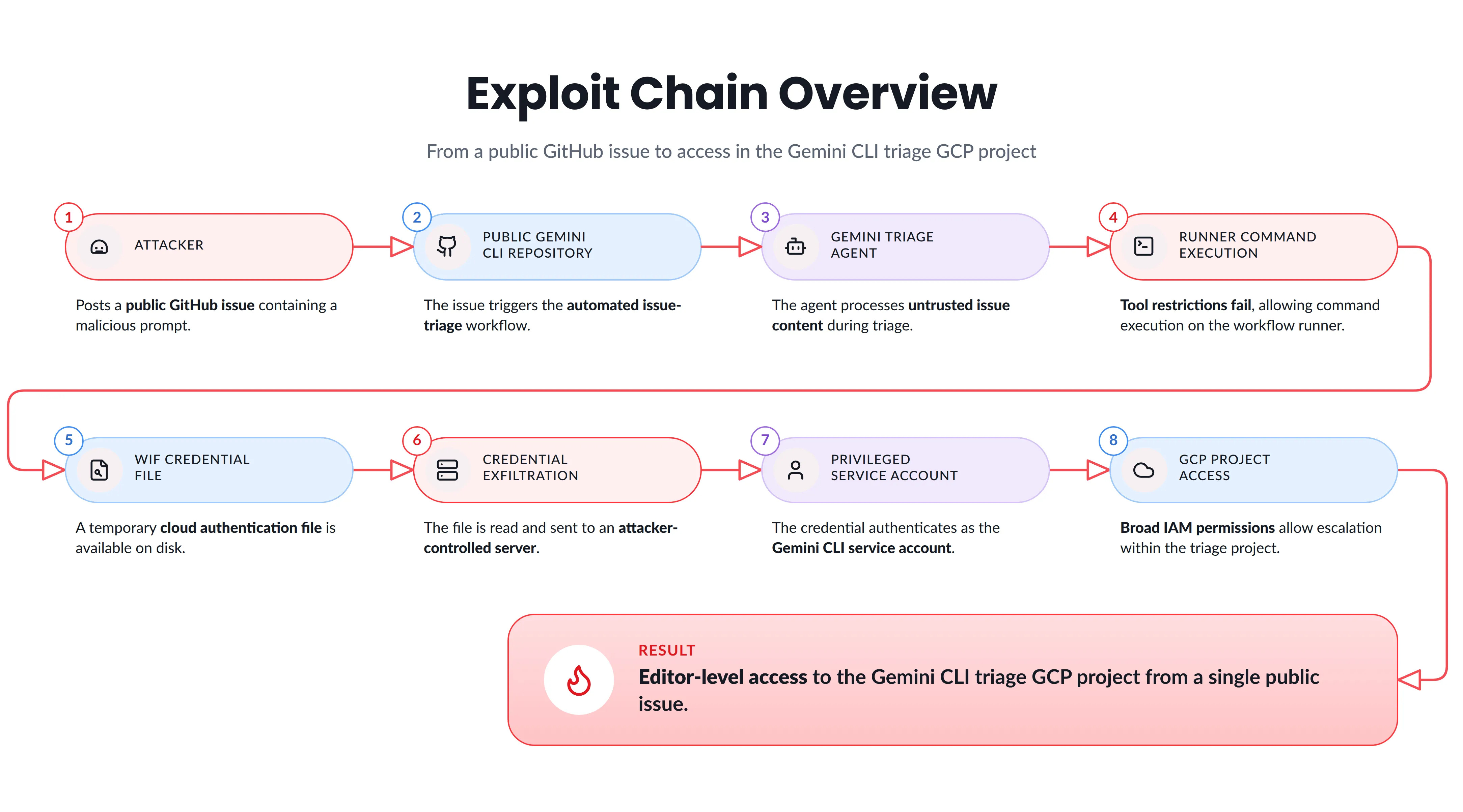
As traditional applications continue to embed agentic components into their workflows, the Pillar Security team continues to uncover security issues that emerge from the way these systems interact with code, infrastructure, credentials, and untrusted input.
In this research, we examine a vulnerability affecting the google/gemini-cli ecosystem. Gemini CLI is Google’s open-source coding agent and has grown into a major developer project, with more than 100,000 GitHub stars and an official npm package distributed as @google/gemini-cli.
The google/gemini-cli repository contained an exploit chain that could allow an attacker to move from a malicious public GitHub issue to command execution inside an automated CI workflow. From there, an attacker could access a plaintext cloud credential file stored on the runner and use it to authenticate as the service account assigned to the workflow. Because that service account had been granted overly broad permissions, those credentials could ultimately be used to impersonate other service accounts and obtain Editor-level access within the affected GCP project.
Google later clarified that the project we demonstrated this against was a dedicated sandbox used specifically for Gemini CLI triage automation. The significance of the finding, however, went beyond that single project.
The permission that enabled the privilege escalation was created by google-github-actions/run-gemini-cli, Google’s official GitHub Action for running Gemini CLI inside automated workflows. Its documentation provided a Workload Identity Federation setup for connecting those workflows to Google Cloud, and Google directed users toward the provided setup script when configuring this authentication method.
This means the issue was not limited to an unusual permission manually configured in a single Google project. The same configuration was present in reusable best practice setup code designed to help organizations deploy Gemini CLI workflows in their own GCP environments. Organizations that used the affected setup flow and exposed Gemini CLI-based actions to untrusted input could therefore have introduced a path from attacker-controlled content to compromise of their GCP environment.
We would like to thank Google for the cooperation and promptly fixing this issue.
False Assumptions
Since my previous published finding on gemini-cli, dubbed Trust Issues, I found another quirky feature that existed inside the gemini-cli repository: the google-github-actions/auth@v2 action creates an OIDC credentials file inside a CI runner which it runs inside in plain text, and on top of that reveals the metadata of the GCP project it's trying to set up OIDC for.
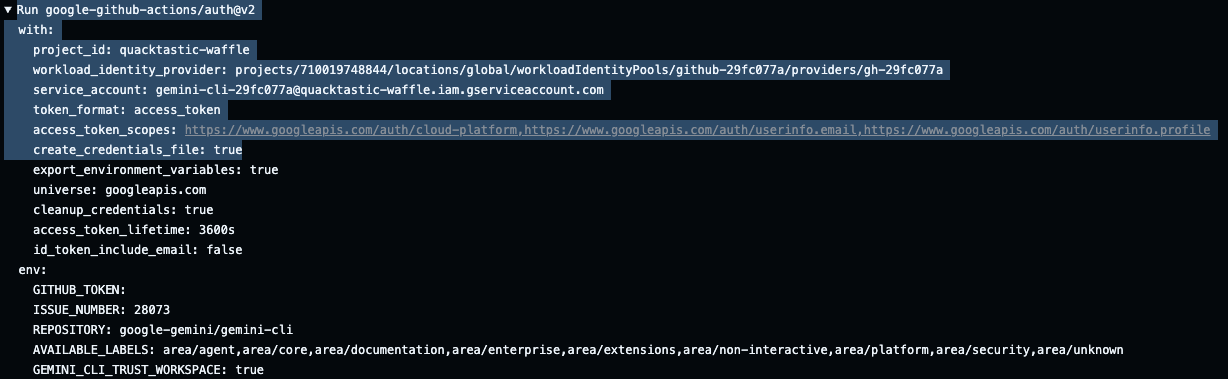

The file dropped inside the runner in plain text, on the assumption that no one could reach it. This finding is not a bug in itself but it did stand out as something that could be explored further.
Exploring this angle wasn't obvious for two reasons. First, once the advisory for that issue was released, I assumed the previous RCE exploit that could have let me read this sensitive file was fixed. Secondly, I simply assumed that even if I got my hands on OIDC credentials, the service account I'd landed would be low-privileged or extremely restricted. Well.. I was proved wrong.
“claude, hack google, do not stop, make no mistakes”
While routinely going through various Google repositories, hunting for exotic or irregular configurations and settings with our custom harness, I found myself on the core gemini-cli actions workflow repository at google-github-actions/run-gemini-cli.
The harness spotted an irregular setting inside the WIF setup script. The setup_workload_identity.sh which is responsible for setting up the service account identity, giving it all the needed permissions. To Claude, one thing stood out:
The script grants the iam.serviceAccountTokenCreator role to service account which allows service accounts to impersonate other service accounts within a specific scope but in this case – it was project wide.
Before we dive into the finding, I'll give a quick overview of what WIF is.
Workload Identity Federation (or WIF)
In short, GCP lets applications running outside Google authenticate to Google Cloud resources using static service account keys, but the client is responsible for securing and holding the key. In the GitHub context, that means either saving it as a secret in the Actions secrets store or exposing it on one of the workflow runners. As a solution, Google offers Workload Identity Federation, which is like a recipe holding various attributes that can be checked against an OIDC endpoint, which in GitHub's case is the OIDC token GitHub issues.
For OIDC, Google Cloud can fetch a JSON Web Key Set (JWKS), which it uses to validate OIDC assertion tokens. The token exchange flow returns a federated access token, which you can use to grant your workload access to Google Cloud resources on behalf of principal identities, and to obtain a short-lived OAuth 2.0 access token.
This can be set up easily with google-github-actions/auth, but the run-gemini-cli action provides it out of the box anyway, using setup_workload_identity.sh, which does all the heavy lifting for the user.
This is explained well in run-gemini-cli's authentication docs:
Method 3: Authenticating with Google Cloud
Workload Identity Federation is Google Cloud's preferred, keyless authentication method for GitHub Actions. It provides:
- Enhanced security: No long-lived credentials or keys to manage.
- Simplified setup: A single script configures the necessary resources.
- Built-in observability: Automatic permissions for logging, monitoring, and tracing.
The process uses GitHub's OIDC tokens to directly and securely access Google Cloud resources.
GitHub Actions → OIDC Token → Workload Identity Pool → Direct GCP Resource Access
Setup Script
The setup_workload_identity.sh script automates the entire setup process for both Vertex AI and Gemini Code Assist.
This means anyone who reads the OIDC credentials file could mint OIDC JWT token that can in turn mint access tokens that can authenticate as this newly created service account and, thanks to the project-wide serviceAccountTokenCreator role, anyone holding the service account can impersonate other service accounts on the project. Any higher-privileged account becomes a direct privilege escalation target.
But who said that the maintainers of google/gemini-cli used this script?
This can be confirmed by inspecting how the setup script generates service account names. It takes the repository name (including a trailing new line), hashes it against SHA-256 and saves the first 8 characters of the hash.

The name is generated as follows – gemini-cli-${REPO_HASH}

And as we already seen inside the repository logs, the service account references during the authentication process is:
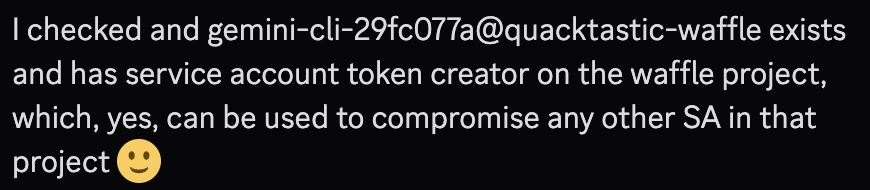
gemini-cli-29fc077a@quacktastic-waffle.iam.gserviceaccount.com
To put a nail in the coffin I contacted one of the Google VRP members to make sure that this service account contains the appropriate permissions on the gemini-cli project, which I’d assume is named internally as quacktastic-waffle, which he did confirm:
So now I know the OIDC credentials file is dropped on disk, and I know it holds the recipe to gain privileged access to the gemini-cli project. Now the question becomes how do I get it?
“No problem, I'll read that for you”
The next question I moved on to was: how do I read this file? A trivial-looking solution presented itself inside the gemini-automated-issue-triage workflow.
The gemini-cli step scopes the tools available under the coreTools field:
So the plan writes itself: have gemini read_file the credentials file, then echo the contents back out, and if everything lines up I should be able to read it straight from the action logs. The only wrinkle is log masking. GitHub masks tokens and secrets in action logs, so gemini has to be asked to chunk the output into groups of 4 characters, so the masker never sees a contiguous secret to match.
Sounds like a plan, right? I tried it in a research dedicated agentic workflows lab and.. well, it wasn't as easy as I first thought, for a few reasons:
- LLMs aren't deterministic. The prompt injection only fires on chance, and even when it does trigger, there's no guarantee the model follows a multi-step "read the credentials, then echo them back in chunks" instruction to the letter. Betting the whole chain on the model complying without resistance is quite a bet.
- There's no tool that dumps file contents straight to the log. run_shell_command is locked to echo, so the only path is read_file into the model's context and then echo it back out. That means trusting the LLM to faithfully reproduce the data it's holding, and the Bearer token field alone is 3000+ characters. Asking a model to emit all of that, in order, in chunks, is asking it to do the one thing models are worst at (and believe me, I tried).
- The request token only works while the job is alive. Once the run finalizes, GitHub stops honoring the token, regardless of the six-hour expiry baked into the JWT. So even if Gemini perfectly leaked the entire file, I'd be in a race to reassemble it and complete the token exchange before the job ended.
In the end, all I managed to leak was about 900 characters of the Bearer token before the model dropped the thread as can be seen inside the actions log:

This was a reportable finding in of itself, but it would be branded as low impactful or information disclosure. I had to find another way.
RCE for the rescue
While building the exploit in the lab, I ran into a peculiar finding. Throughout my tests I'd been leaning on the harness to drive an exploit template whose goal was to make Gemini read the token and echo it back out through various prompt injections. I assumed it would work eventually.
At some point the harness decided, seemingly on its own, to have the Gemini agent run python via run_shell_command from inside the prompt injection. The anomaly was that it actually worked: Gemini executed shell commands well outside its defined scope.

The key log line holds this content: [PolicyEngine.check] MATCHED rule: toolName=*, decision=allow, priority=1.998, argsPattern=none
This line means that any tool is allowed, which means run_shell_command can execute any bash command without restrictions.
What?
To understand what happened, I had to go back to advisory GHSA-wpqr-6v78-jr5g. The bug it was meant to fix involved Gemini running under --yolo, exactly what happens in workflows using gemini-cli. Under those modes there was no tool scoping at all, so Gemini could execute any command.
That issue was fixed, though, and I'd taken the advisory at face value. The coreTools setting was supposed to do exactly that and scope the tools properly. So why was Gemini running python?
In the context of the gemini-cli repository the previous vulnerability I found, let Gemini run bash commands outside the scope of the defined tools to grab the GITHUB_TOKEN on the workflow runner, a token scoped with actions: write, which an attacker could then use to execute high-privileged workflows. Reading the GITHUB_TOKEN was no longer an option since one the patches introduced to the workflow code was issuing persist_credentials: false to the checkout step which without this setting persists the token on disk inside .git/config.
But if I can still theoretically get an RCE on the runner, I can read the OIDC credentials file and send it to the attacker. So was Gemini really running arbitrary code using bash commands outside its defined scope or was it all a model hallucination?
The answer was sitting in the version of gemini-cli the action actually ships.
It Was all A Legacy After All
I'd assumed coreTools did what it looks like it does: an allowlist that boxes the agent into echo and read_file. But on the current CLI (0.46.0, which is what @google/gemini-cli@latest resolves to at the time of writing this blog), it turns out that this key isn't read anymore. The CLI only pulls the allowlist out of the nested key tools.core packages/cli/src/config/config.ts:978:
There's no top-level coreTools in the settings schema anymore, only tools.core and tools.allowed. So when the workflow hands the CLI a top-level coreTools, the key matches nothing and gets dropped.
And this is what turns it into RCE: with no allowlist applied and --yolo set, the CLI falls back to a wildcard "allow all" rule. Every tool, including an unrestricted run_shell_command, is fair game.
This is the same remote code execution that GHSA-wpqr-6v78-jr5g, a CVSS 10.0, was supposed to close. The fix does enforce allowlists under --yolo, but only for the new tools.core / tools.allowed keys. These workflows don't use those keys.
One Chain to Rule Them All
Now I had every link I needed.
- The triage workflows (gemini-automated-issue-triage.yml and the rest of the scheduled-triage and dispatch family) run gemini --yolo over the text of incoming GitHub issues. Untrusted attacker input, handed to an agent with a wildcard tool policy.
- Because the coreTools allowlist is inert, a prompt injection in an issue can call run_shell_command with anything it likes. So I had arbitrary RCE on the runner.
- The runner has the WIF credentials file on disk, because the workflow authenticates to GCP. The injected command reads it and exfiltrates it out.
- That file is the token-minting machine from earlier. With it, I can mint a GCP access token and authenticate as the gemini-cli service account.
- Because of the project-level roles/iam.serviceAccountTokenCreator over-grant, it can impersonate any service account on the project, including the Compute Engine default service account, which carries Editor.
A prompt injection in a GitHub issue, sent by someone with no access of any kind, ends in a full Editor on the gemini-cli GCP project.
To prove it end to end I mirrored gemini-automated-issue-triage.yml exactly. The only change was relaxing the system prompt so the agent reliably attempts the command. That isolates the configuration defect, the broken allowlist, from the model's own tendency to resist a sketchy instruction. In a real attack scenario, a sufficiently motivated attacker could perfect a prompt injection against the system prompt in his own mirrored environment because system prompts are not a security boundary, eventually the attacker would have found something that worked.
The attacker opens an issue. The body is the injection:
The attack would exfiltrate the OIDC credentials file to the attackers C2 server and then sleep for 5 minutes. This would extend the lifetime of the OIDC credentials by keeping the runner alive. Finally, the attacker would mint an access to the GCP service account.
This can be observed live over my test lab here:
Conclusion
The way agents are embedded into open and closed source applications changes the attack surface and the threat model. In the 'before agents' world, unless an attacker found a way to execute code on a workflow runner, the OIDC Google auth credentials file was deemed safe. But because agentic workflows enable code execution, new attack surfaces prop up that were never accounted for, and in turn change the threat model. Suddenly developers have to consider failures of agent identity, excessive agency, or just classic application security problems that cause the agent harness to behave unexpectedly. In this case, the agent can read sensitive files and expose parts of them, and it can run code: an unexpected behavior such as not scoping the agent's tools leads to all tools being allowed.
I'd like to thank Google for the quick remediation. They promptly fixed both issues, tightening how tools are scoped and stopping Gemini from reading the OIDC credentials file by adding it to .geminiignore, which makes the agent blind to the file itself and by updating the setup_workload_identity.sh script which restricted roles/iam.serviceAccountTokenCreator to the single service account resource rather than project-wide. Google explained that quacktastic-waffle is a dedicated sandbox GCP project created specifically for hosting Gemini CLI triage automation.
As these technologies develop, we at Pillar are excited to keep exploring, breaking, fixing, and offering solutions in this brand new world. Till next time.
Why this matters
The broader lesson is not limited to Gemini CLI.
Agentic workflows increasingly sit between untrusted input and sensitive organizational infrastructure. They read issues and pull requests, modify code, execute commands, access cloud services, and operate using identities that may have meaningful permissions. A mistake that would once have been a relatively contained CI configuration problem can become substantially more serious when an AI agent is able to interpret attacker-controlled content and act on it.
For organizations deploying similar systems, the security boundary cannot simply be the agent's prompt or its intended instructions. The surrounding infrastructure has to assume that the agent may eventually behave in an unexpected way.
Pillar Security customers are already protected against this class of risk. Our platform helps organizations secure agentic workflows across the software development lifecycle — from detecting and blocking malicious prompts designed to manipulate agents, to identifying risky configurations and excessive permissions in CI/CD environments where those agents operate.
As AI agents gain access to source code, developer tools, cloud credentials, and automated deployment pipelines, securing the model alone is no longer enough. Organizations also need visibility into the infrastructure surrounding the agent and the permissions it inherits. Pillar Security helps teams identify these weaknesses before they can be combined into an attack chain, reducing the risk that a compromised agent becomes a path into the broader development or cloud environment.
Disclosure Timeline
- June 11, 2026 — Initial report submitted. We reported the issue to Google through its vulnerability reward program. Google acknowledged the report and accepted it for further investigation the same day.
- June 17, 2026 — Initial fixes identified. Google introduced changes that addressed the main issue.
- August 14, 2026 — Fix verified and publication approved. Google confirmed that the issue had been fixed and reviewed the blog draft.
- August 18, 2026 — Google Issues a bounty for the bug.
FAQs
How did the gemini-cli exploit chain lead to GCP project compromise?
A prompt injection in a public GitHub issue reached a triage workflow running Gemini CLI with an inert tool allowlist, yielding arbitrary command execution on the runner. The injected command read a plaintext OIDC credentials file, which was used to authenticate as the workflow's service account. A project-wide token-creator role then allowed impersonating an Editor-level service account.
Why was the Gemini CLI tool allowlist ineffective in the affected workflows?
The workflows set a top-level coreTools key, but Gemini CLI 0.46.0 no longer reads it; the allowlist now comes only from the nested tools.core and tools.allowed keys. The unrecognized key was dropped, so no allowlist applied. Combined with --yolo mode, the CLI fell back to a wildcard rule allowing every tool, including unrestricted shell execution.
What was the Workload Identity Federation misconfiguration in run-gemini-cli?
The setup_workload_identity.sh script granted roles/iam.serviceAccountTokenCreator at project scope rather than to a single service account. Anyone able to authenticate as the created service account could then impersonate any other service account in the project, including the Compute Engine default account that carries Editor. The script was Google's documented setup for connecting workflows to Google Cloud.
Was this vulnerability limited to Google's own GCP project?
No. Pillar demonstrated it against quacktastic-waffle, a dedicated Gemini CLI triage sandbox project, but the over-broad permission came from run-gemini-cli's reusable setup script. Any organization that used the affected Workload Identity Federation flow and exposed Gemini CLI actions to untrusted input could have introduced the same path from attacker-controlled content to GCP compromise.
How did Google remediate the gemini-cli WIF vulnerability?
Google made the agent blind to the OIDC credentials file by adding it to .geminiignore, and updated setup_workload_identity.sh to scope roles/iam.serviceAccountTokenCreator to a single service account resource instead of the whole project. Tool scoping was also tightened. Pillar reported the issue on June 11, 2026, with the fix verified by August 14, 2026.
Subscribe and get the latest security updates

Back to blog

.png)
%20(1).webp)
.png)
.webp)